3 Getting Started
This section provides users with detailed information on program setup and configuration of the master program parameters. For more information on the technical requirements for running the QA Package, please refer to section 1.2: Technical Requirements.
3.1 Program Set-up
3.1.1 Download the QA Package from Sentinel git
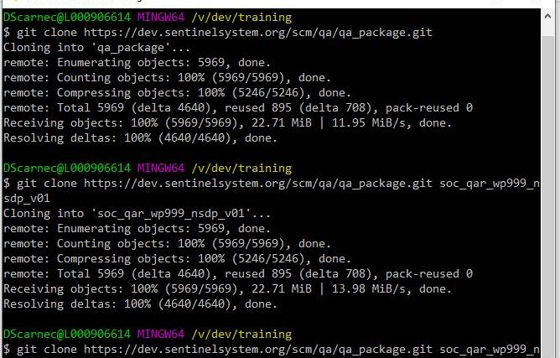
- Using git, clone the QA Package from the Sentinel git repo, into a folder using the package’s RequestID:
git clone https://dev.sentinelsystem.org/scm/qa/qa_package.git soc_qar_wp999_nsdp_v01.
3.1.2 Configure the Master Program
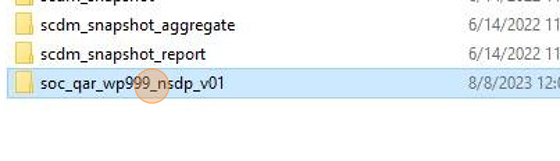
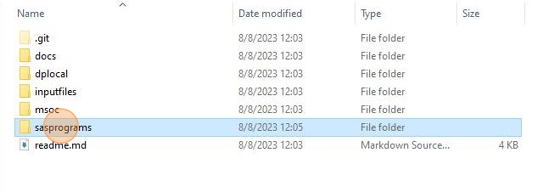
- Open the QA Package folder.
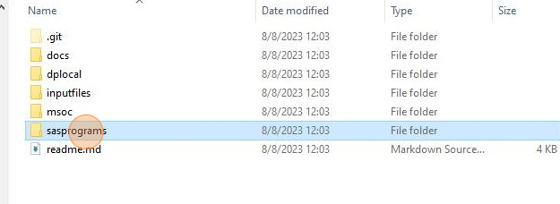
- Open
sasprograms.
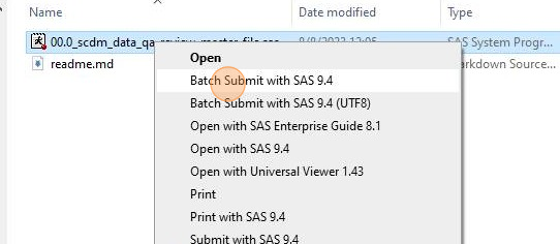
- Open the file
00.0_scdm_data_qa_review_master_file.sasin SAS or a text editor.

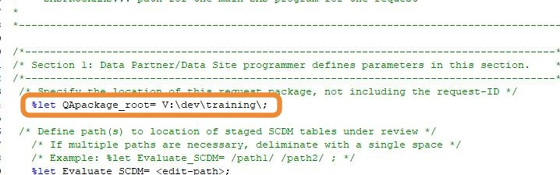
- Find the parameter
QAPackage_rootand populate it with the path to the directory containing the QA Package. This should be the path from which the program will be run.
- Populate the parameter
Evaluate_ETLwith the path or paths to the SCDM tables to be evaluated by the QA Program Package.

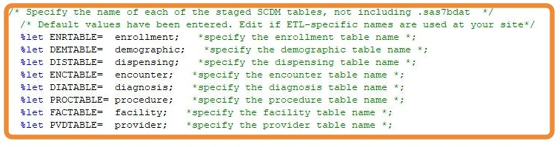
- Review the SCDM table parameters, checking to make sure the defaults match the filenames of the datasets containing each SCDM table to be evaluated. If they do not, update to match the dataset filenames.
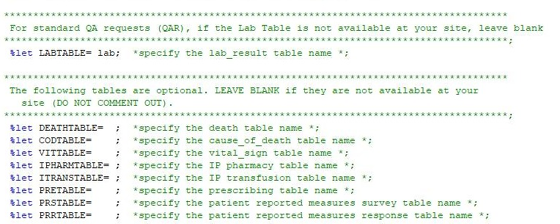
- Populate table parameters for any optional SCDM tables being evaluated.
- Locate the request parameters.
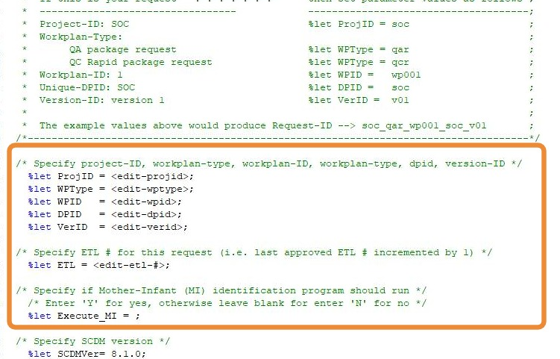
- Populate
ProjID,WPType,WPID,DPID, andVerIDparameters. These parameters should match the RequestID of the program package.

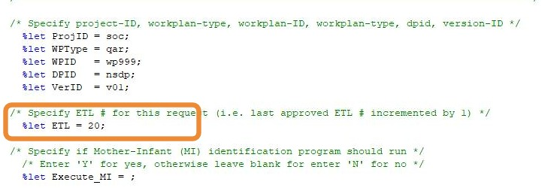
- Populate the parameter
ETLwith the number of this data refresh.
- If the Mother-Infant Linkage table is to be populated, set
Execute_MItoY. Otherwise, set toNor leave blank.
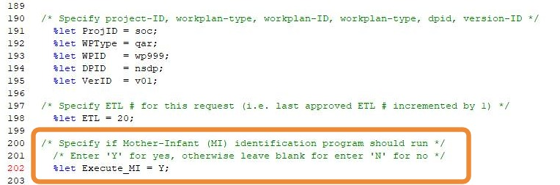
- Save
00.0_scdm_data_qa_review_master_file.sasand close.
3.1.3 Configure QA Package Control Flow
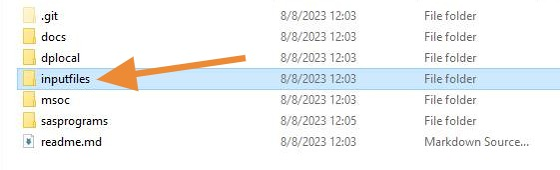
- Navigate back to the root directory of the QA Package. Then open the folder
inputfiles.
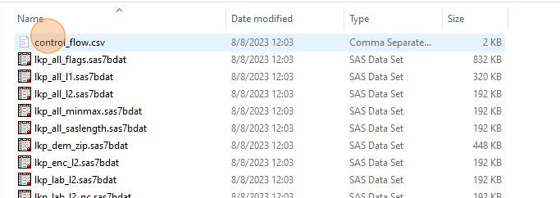
- Open
control_flow.csvin a text editor.
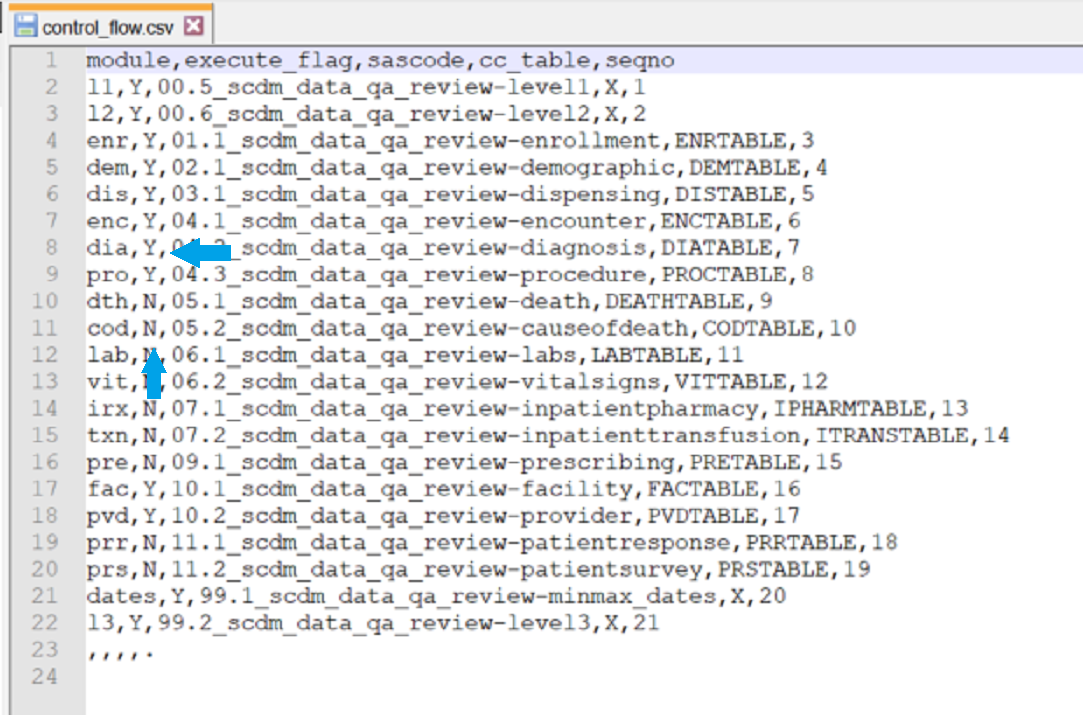
- For any optional SCDM tables being evaluated, change the value of
execute_flagtoY.
- Save
control_flow.csvand close.
3.2 Master Program Parameters
The master SAS program found in sasprograms/00.0_scdm_data_qa_review_master_file.sas contains several parameters that must be specified by the user. These include the directory containing the QA Package, project, work plan, Data Partner identifiers, and a version identifier. Table 3.1 contains detailed specifications for master program parameters.
| Parameter | Field Name | Description |
|---|---|---|
| Path name for QA Package folder | QAPACKAGE_ROOT | Location of the QA Package root directory. |
| Format: Alphanumeric | ||
| Example: /apps/socrequests/ | ||
| Path name for staged SCDM tables | EVALUATE_SCDM | Location of staged SCDM tables under review. |
| Note 1: If multiple paths are necessary, delimit with a single space | ||
| Format: Alphanumeric | ||
| Example: /sentinel/etl14/tables | ||
| Enrollment table name | ENRTABLE | Specifies the enrollment table name. Value should exclude the .sas7bdat extension part of the file name. Default values are provided. |
| Example: enrollment | ||
| Demographic table name | DEMTABLE | Specifies the demographic table name. Value should exclude the .sas7bdat extension part of the file name. Default values are provided. |
| Example: demographic | ||
| Dispensing Table name | DISTABLE | Specifies the dispensing table name. Value should exclude the .sas7bdat extension part of the file name. Default values are provided. |
| Example: dispensing | ||
| Encounter Table name | ENCTABLE | Specifies the encounter table name. Value should exclude the .sas7bdat extension part of the file name. Default values are provided. |
| Example: encounter | ||
| Diagnosis Table name | DIATABLE | Specifies the diagnosis table name. Value should exclude the .sas7bdat extension part of the file name. Default values are provided. |
| Example: diagnosis | ||
| Procedure Table name | PROCTABLE | Specifies the procedure table name. Value should exclude the .sas7bdat extension part of the file name. Default values are provided. |
| Example: procedure | ||
| Facility Table name | FACTABLE | Specifies the facility table name. Value should exclude the .sas7bdat extension part of the file name. Default values are provided. |
| Example: facility | ||
| Provider Table name | PVDTABLE | Specifies the provider table name. Value should exclude the .sas7bdat extension part of the file name. Default values are provided. |
| Example: provider | ||
| Lab Results Table name | LABTABLE | Specifies the laboratory results table name. Value should exclude the .sas7bdat extension part of the file name. |
| Example: lab_results | ||
| Death Table name | DEATHTABLE | Specifies the death table name. Value should exclude the .sas7bdat extension part of the file name. |
| Example: death | ||
| Cause of Death Table name | CODTABLE | Specifies the cause of death table name. Value should exclude the .sas7bdat extension part of the file name. |
| Example: cause_of_death | ||
| Vital Signs Table name | VITTABLE | Specifies the vital signs table name. Value should exclude the .sas7bdat extension part of the file name. |
| Example: vital_signs | ||
| Inpatient Pharmacy Table name | IPHARMTABLE | Specifies the inpatient pharmacy table name. Value should exclude the .sas7bdat extension part of the file name. |
| Example: ip_rx | ||
| Inpatient Transfusion Table name | ITRANSTABLE | Specifies the inpatient transfusion table name. Value should exclude the .sas7bdat extension part of the file name. |
| Example: ip_trx | ||
| Prescribing Table name | PRETABLE | Specifies the prescribing table name. Value should exclude the .sas7bdat extension part of the file name. |
| Example: prescribing | ||
| Patient Reported Measures Survey Table name | PRSTABLE | Specifies the patient reported measures survey table name. Value should exclude the .sas7bdat extension part of the file name. |
| Example: prs | ||
| Patient Reported Measures Response Table name | PRRTABLE | Specifies the patient reported measures response table name. Value should exclude the .sas7bdat extension part of the file name. |
| Example: prr | ||
| Project Identifier | PROJID | Project identifier for internal SOC identification and tracking |
| Format: Alphanumeric | ||
| Example: soc | ||
| Work Plan Type | WPTYPE | Work plan type for internal SOC identification and tracking. |
Valid Values:
|
||
| Note 1: This value is used to conditionally select the appropriate inputfiles for the distributed database type. | ||
| Format: Alphanumeric | ||
| Example: qar | ||
| Workplan Identifier | WPID | Work plan identifier for internal SOC identification and tracking. |
| Note 1: Should follow the format wp[###]. | ||
| Note 2: Should be used to uniquely identify packages distributed against given ETL | ||
| Format: Alphanumeric | ||
| Example: wp001 | ||
| Data Partner Identifier | DPID | Data Partner identifier for internal SOC identification and tracking. |
| Format: Alphanumeric | ||
| Example: nsdp | ||
| Version Identifier | VERID | Version identifier for internal SOC identification and tracking. Should track each re-distribution of the package (if multiple distributions are required). |
| Note 1: Should follow the format v[##]. | ||
| Format: Alphanumeric | ||
| Example: v01 | ||
| ETL Number | ETL | ETL Number for this request. |
| Format: Numeric | ||
| Example: 22 | ||
| Mother-Infant Identification Program | EXECUTE_MI | Parameter indicating whether the Mother-Infant Identification Program should run. |
Valid Values:
|
||
| Note 1: If left blank, parameter will default to N | ||
| Format: Alphanumeric | ||
| Example: Y | ||
| Use ZIP3 | ZIP3 | Specifies whether a three or five digit ZIP code value is available. |
Valid Values:
|
||
| Example: Y | ||
| Sentinel Common Data Model Version | SCDMVER | Parameter indicating the version of the Sentinel Common Data Model in which the data the QA Package is to run against is formated. |
| Format: Alphanumeric | ||
| Example: 8.1.0 |